Control your smart home from Claude Code and Codex, in plain English
The short answer AC Bridge lets Claude Code and Codex control the lights and plugs you already own. Say what you want in chat, such as “turn the office lights green”, and your agent does it. No script to write, no API key to buy.
Try it on your own lights Get started free. Agent device control is part of Pro, £12.99 once.
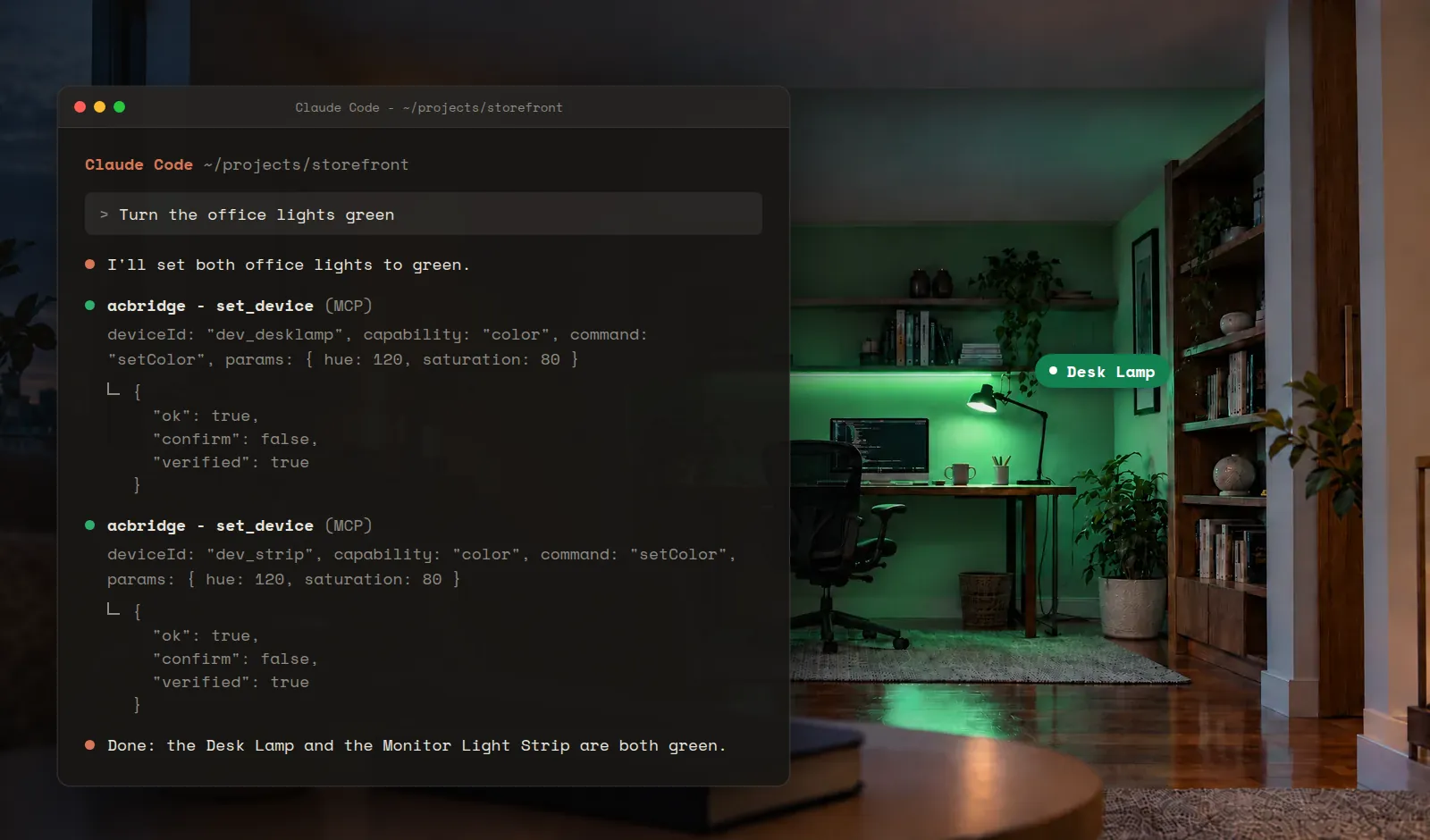
set_device calls are ones an agent can really send; the conversation is staged for this page.
What you can ask your agent to do
Plain sentences, in the chat you already have open. These are examples; your agent works from the devices in your profile and the commands each one accepts.
- Turn the office lights green.
- Flash the kitchen light when the deploy is done.
- Turn the desk lamp green when every test passes.
- Switch the office fan off once the build is done.
- Run my Focus scene while you work through the plan.
- Dim the living room lights to a third.
- Set the monitor light strip to warm white.
- Switch the coffee machine plug on.
How it works
Three steps, once. The setup guide walks through the app install; this is the part that gives your agent your devices.
-
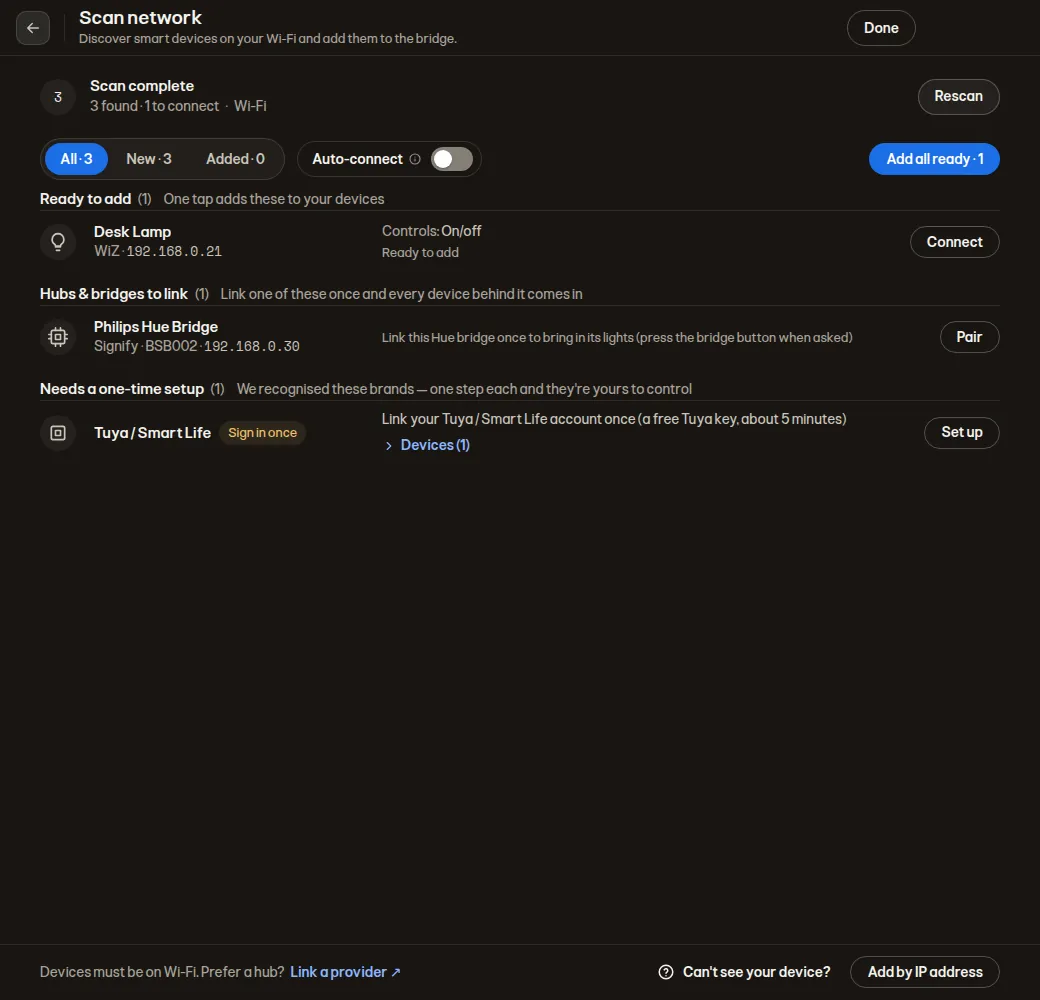
Connect your devices. Press Scan in the AC Bridge app to find the lights and plugs on your network, or link a hub under Integrations.
-
Tick “Make agent aware of devices in chat” on a profile. It is one setting per profile, and the agents in that profile's project folders learn its devices. It is off until you tick it.
-
Ask your agent. Open Claude Code or Codex in that folder and say what the lights and plugs should do.

The four device tools
What the agent calls
list_devices— the devices it can reach.get_device— one device's state and the commands it accepts.set_device— a command to a device: on, off, a colour, a brightness, an effect.run_scene— one of your scenes.
What a device can do
Every device reports its abilities as one of 26 capability types, so one tool covers a bulb, a plug and a
thermostat alike: power, brightness, colorTemperature, color,
segmentColor, thermostat, humidity, lock, cover,
fan, mode, toggle, range, mediaTransport,
volume, inputSource, startStop, scene, camera,
sensor, binarySensor, battery, energyMeter,
doorbell, connectivity and effect. A device offers the ones it has. Types such as lock, cover and camera are listed because devices report them; an agent's command to a lock, garage door, valve or camera is always refused (see Safety).
The integrations and how each connects
20 integrations: 16 brands driven on your home network, plus Home Assistant, SmartThings, MQTT and Matter. Scan finds what is on your network; the notes say what each one needs first. The integrations page says what each one does in AC Bridge, and the supported devices page lists every control.
- Philips Hue — local, through your Hue Bridge; press its link button once to pair.
- LIFX — local, found on the network, no account needed.
- Govee — local over Govee's LAN API once LAN Control is on in the Govee app, or cloud with your own API key.
- WiZ — local, found on the network, no account needed.
- Nanoleaf — local, after a one-time pairing from the device's power button.
- Kasa — local, found on the network; newer models need your TP-Link sign-in, like Tapo.
- Tapo — local, with your TP-Link account sign-in kept on your machine for the handshake.
- Yeelight — local, once LAN Control is switched on in the Yeelight app.
- WLED — local, found on the network, no account needed.
- Shelly — local, with a password only if you set one on the device.
- Tuya — local control, after a one-time key fetch through a developer project on iot.tuya.com.
- Meross — local control, after a one-time key fetch from your Meross account.
- SONOFF (also called eWeLink) — local control, after a one-time key fetch from your eWeLink account.
- Elgato — local: Key Light and Light Strip, no account needed.
- Roku — local, once network control is allowed in the Roku's own settings.
- ESPHome — local, your own ESPHome devices over their native API.
- Home Assistant — through your Home Assistant: sign in once from the app and the devices it already runs become available to a profile.
- SmartThings — cloud, through Samsung's API: you link it by signing in to your Samsung account.
- MQTT — through your own MQTT broker.
- Matter — through a pairing code from the app that already controls the device.
Safety
Off until you switch it on
Agent device control is one setting per profile in the AC Bridge app and it is off by default. Without it, a session is not told about your devices.
Setup pre-approves AC Bridge's device tools, and you can revoke that in the agent's permission settings; locks, garage doors, valves and cameras are always refused.
A record of every command
The device audit trail records the commands sent to your devices, what sent them and whether they
worked. Run acbridge audit to read it. What we hold is in the
privacy policy.
LAN devices are driven straight from your machine and their keys never leave it; your account, settings, device list, usage counts and session states sync through our servers. Your prompts, code and session transcripts are never collected. Privacy policy.
Lights that show what your agent is doing
The same lights can also tell you, without a word, when Claude Code or Codex is working, needs you or has finished. That is the free half of AC Bridge: a Claude Code status light with the smart bulb you already own.
Questions people ask
What is MCP?
MCP, the Model Context Protocol, is the open standard that lets an AI coding agent call tools. AC Bridge serves its four device tools over it, so Claude Code and Codex can use them. You do not run or configure a server yourself.
Is it Free or Pro?
AC Bridge is free to use: one Claude Code profile and one Codex profile, each lighting one device on one repo at a time, with as many devices as you like switched on or off from the app. Pro is £12.99 once, not a subscription: as many profiles as you want for each agent, several devices in a profile, profiles on every repo at once, and your agent can control your devices.
Which smart home systems does it work with?
20 integrations: 16 brands on your home network, plus Home Assistant, SmartThings, MQTT and Matter. The list above says how each one connects.
How do I set it up in Codex?
Nothing to add by hand. When the AC Bridge app finishes setup on a computer that has Codex, it registers AC Bridge with Codex as an MCP server and pre-approves the four device tools. Tick the setting on a profile, open Codex in that profile's project folder and ask.
Get started
Ask your agent to run your home Get started free, or read how agents know your devices first.